# Controlling the pages of the book
## Overview
Controlling the behavior of the book is straight forward and easy. You can use the exposed blueprint functions o perform the different actions on the ``BookMenuActor`` class:
- ``Open Book At`` - Opens the book on a given index
- ``Close Book`` - Closes the book
- ``Jump to Page Section`` - Performs a Page Turn Animation to move forward or backward in the book pages
## How to call the functions?
The above mentioned functions are implemented in the ``BookMenuActor`` class. To call those functions, you can either invoke them on the ``BookMenuActor`` directly or calling them from anywhere by using a reference of the respective ``BookMenuActor``
__On the BookMenuActor directly__
Inside a Blueprint which is derived from ``BookMenuActor``, you can directly call the book control functions:
[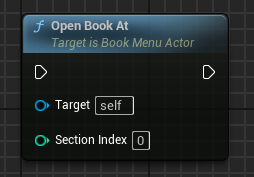](https://docs.suricoon.com/uploads/images/gallery/2024-07/image-1721559085718.png)
__On the BookMenuComponent__
If you have a reference to the ``BookMenuComponent`` you can call the book menu control functions via a reference on the ``BookMenuActor``:
[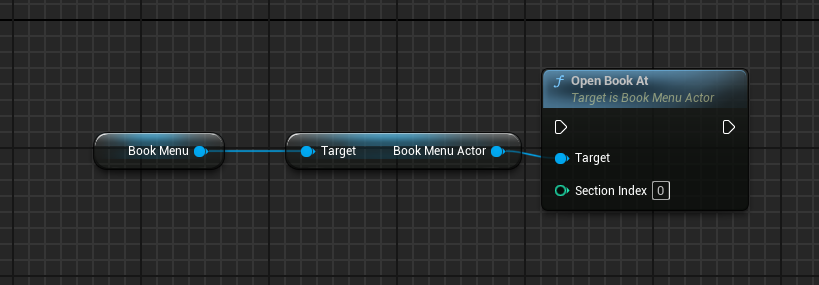](https://docs.suricoon.com/uploads/images/gallery/2024-07/image-1721559133617.png)
## Book Control Functions
### Open Book At
| Parameter | Description |
|------------------|---------------------------------------------------------------|
|Section Index | The Page Section Index to be displayed while opening the book |
Use this function to open the book on a specific ``page section index``. By default this is 0 which means that the book will open on the first pair of pages.\
> **Hint** - If the book is already in an opned state, call ing this function will implicitly call the ``Jump to Page Section`` function instead
To find out if the book is opened or closed you can us the following function:
The function will return ``true`` if the book is already fully open.\
The function will return ``false`` if the book is closed or the open animation is still in progress.
To find out if the book should be opening at the moment, you can call the following function:
The function will return ``true`` if the book should be in an open state but is not yet fully open. \
The function will return ``false`` if the book is fully open.
### Close Book
This function will close the book.
To find out if the book should be in a closed sate, you can call this function:
The function will return ``true`` if the book should be in an closed state but is not yet fully closed. \
The function will return ``false`` if the book is fully closed.
### Jump to Page Section
| Parameter | Description |
|------------------|-------------------------------------------|
|Section Index | The Page Section Index to be navigated to |
Using this function you can navigate through the ``page sections`` of the book. Depending on the ``Current Page Section Index`` the function will either perform a page turn animation forward or backwards.
> **Examples:** - If the ``Section Index`` parameter is greater than the ``Current Page Section Index`` a page turn forward will be performed\
if the ``Section Index`` parameter is smaller than the ``Current Page Section Index`` a page turn backward will be performed
To get the current active page section index you can call the following function:
This will return the index of current active ``page section index``
> **Note:** - Do not confuse the ``page scetion index`` with the ``page index``. The ``page index`` indicates the left ``0`` or right ``1`` page of a page section